Monday, April 28, 2008

Where will you spend your Stimulus Check?

image As you may have already heard, the US government will be distributing stimulus checks (aka. tax rebate checks) a few days earlier than expected.  Personally, I am not convinced that a couple hundred dollar government sponsored rebate check for each household is going to save the US economy.  On the other hand, I'm not an economist, so I'm willing to take part in the rebate "experiment".

Following are a few tips to maximize your stimulus check spending.

  • Sears is offering an additional 10% when you use your rebate check to purchase a Sears gift card.  Sears gift cards can be used at Sears, Kmart, and Lands End.
  • SuperValu will redeem stimulus checks for gift cards and add $30 to each $300, or 10%.  SuperValu gift cards can be purchased and used at all SuperValu owned stores which includes Acme, Albertsons, bigg's, Cub Foods, Farm Fresh, Hornbacher's, Jewel-Osco, Lucky, Shaw's/Star Market, Shop 'n Save and Shoppers Food & Pharmacy.
  • Kroger Stores is offering a similar 10% rebate check for gift card exchanges at all of it's stores which includes Kroger, Baker’s, City Market, Dillons, Fred Meyer, Fry’s, Gerbes, Hilander, Jay C, King Soopers, Owen’s, Pay Less, Ralphs, Smith’s and QFC stores.
  • RadioShack is offering a 10% discount on all purchases when you use your stimulus check to make your purchase at any of the 6,000 RadioShack stores.
  • Roundy's, a 153 store grocery retailer in the Midwest, is offering a $30 for each $300 (10%) bonus on all stimulus check exchanges at their Pick 'n Save, Copps, Rainbow and Metro Market stores in Wisconsin and Minnesota.

For me, I'm thinking of maximizing my stimulus check on the staples (not the office supply store; I mean food).  10% seems to be the sweet spot for stimulus check incentives and I'll always need food, so the Supermarket seems to make the most sense to me.  How about you?  What do you plan to do with your stimulus check?

Sunday, April 27, 2008

GTD Digest 2008-04-27

Weekly recap of GTD highlights (news, views, tips and tricks) from around the web

[7 Entries]

Productivity is the latest web craze
The Star-Ledger - NJ.com - Newark,NJ,USA
Getting things done, in fact, is the title of a best-selling book ("Getting Things Done" by David Allen), as well as a popular productivity method and an ...

How I Use Google Calendar as a GTD tool
By Carrie
I’m SO OVER THAT. Google calendar far surpasses Outlook in ease of use where getting things done is concerned. Here’s what I do with it : I should just get out of the way that it’s free and an [...]

David Allen: Mental Ecology
By David Allen(webmaster@huffingtonpost.com)
In honor of Earth Day, let's look at how to use our natural mental resources more effectively. My systems are set up and maintained with a standard of thinking as little as possible. That way I can use my mind to think ABOUT my work, ...

Fast GTD on Windows Mobile
By jeff
I’ve been a fan of David Allen’s Getting Things Done time management methodology for years. And while I had it down to a science on my various Palms and Treos, a really good GTD implementation has eluded me on Windows Mobile until just ...

How will sugar, water, and stimulants affect my work during the day?
By LauraStack
(NOTE: We're moving! The Productivity Pro(R) blog has moved to http://www.theproductivitypro.com/blog/. We will continue to post here through May as well. Please change your feed to the new address, or you won't receive posts after May. ...

Are you having trouble getting out of bed?
American Chronicle - Beverly Hills,CA,USA
The point here is to get you used to getting things done; to taking consistent action on a daily basis. In due course, you will attain the habit of taking ...

Simply GTD with Kelly: Rolling up your hoses when you're not ...
By kelly@davidco.com (Kelly)
We were in a staff meeting the other day discussing some of the finer points of David Allen's 3-Fold nature of work. Part of the Doing phase, the 3-Fold nature describes how you spend your time: Doing Pre-defined Work (choosing from ...

Friday, April 25, 2008

Create a temporary space for your stuff

image Just about any time I use my computer, I create or find stuff (on the Internet) that I do not need to keep long term.  An e-mail attachment I want to review, a file that installs an application I want to try, a white-paper that I want to quickly read.  I find that if I tuck these files away in a sub-folder, I can rarely find them again.  If I simply save them in the My Documents folder, I lose track of the name and end up with a long list of trash collecting in the My Documents directory.

Remembering back to the good old days of DOS, I longed for an old fashion C:\TEMP directory.  Somewhere to store files on a temporary basis.  Someplace I can safely clean-out without having to worry if it is something I need.  If it's in the TEMP directory, it's free game for deletion. 

As you can guess, this was  not too challenging to replicate in the Windows environment.  I created a My Documents\TEMP folder.  This is my default dumping ground for things I do not necessarily want to keep.  Install files, papers to review, temporary document drafts.  If I find that I need a file, I move it to a safe place.  If not, it stays in the My Documents\TEMP folder and is periodically purged with the rest of my junk.

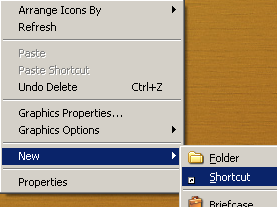
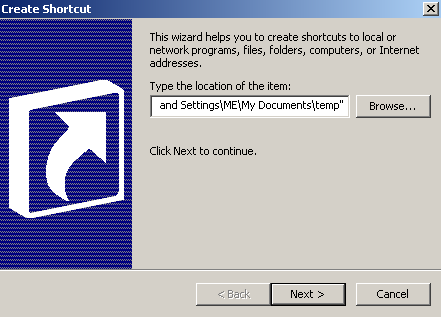
Simple and clean!  If you are one that frequently saves files to your desktop, you could take this a step further and create a desktop shortcut that point to the My Documents\TEMP folder.  Now, it does not matter if you are navigating your My Documents folder or your Desktop, you have one spot for your temporary stuff.

image image image

Wednesday, April 23, 2008

The Oracle of Organization

For me, getting things done all started with an article in Time Magazine called "The Oracle of Organization".  This article prompted me to buy the book, Getting Things Done by David Allen and learn about David's  philosophies on personal productivity.  Since then, my life has changed.

  • I am more organized.
  • My work/life balance is "balanced".
  • I am far more efficient in everything I do.
  • I learned to focus on only the most important things in my life and work.
  • I found free time to do things like blogging!

I speak about this epiphany on my "About Me" page.  If you have not read the Time Magazine article, I'd highly recommend it!

Tuesday, April 22, 2008

A Simple Guide to RSS

As you surf the web, I am sure you have seen references to RSS.  As a minimum, I am sure you have at least run across the universal RSS icon;  image.  So what does it mean? 

RSS stands for Really Simply Syndication.  RSS has also been called a "feed" or "Channel".  Basically, through RSS, a blog or web-site content can be read like an online newspaper.  That is; article by article.  RSS readers allow you to collect many websites and/or blogs and read them in a clean, organized fashion.  Rather than jumping from website to website or blog to blog, an RSS reader will present all the content (articles) to you in one place. 

To start with RSS, you need an RSS reader (aka feed reader).  Which RSS reader is best?  There are many available, it's up to you.  Here are the most popular RSS readers that myGTDstuff.com readers use:

I prefer Google Reader.  It's simple, has a clean interface, and shares the same user-id and password with other Google services (Gmail, Picassa, Docs, etc). 

Assuming you now have an RSS Reader, how do you use it?  This is where things can get a bit confusing.  First, you need to add a few "feeds" to your RSS reader.  Again, a feed, is simply content from a blog or website.  Adding feeds to your RSS Reader (aka subscribing) can be as simple as clicking the universal RSS icon image, also known as a chicklet, or copying and pasting the address (URL) of the RSS feed into your RSS Reader. 

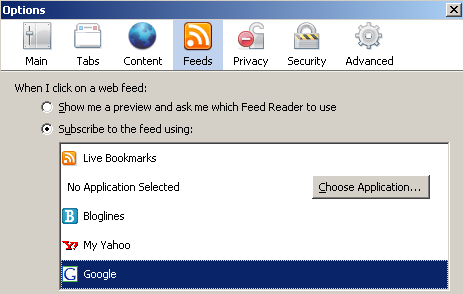
How you subscribe to a feed may depend on which Internet Browser you use.  I use two different browsers, Internet Explorer 6.0 and Mozilla Firefox 2.0.  Firefox is far more RSS friendly than IE 6.  I have not upgraded to IE 7, so I cannot comment on IE 7 RSS capabilities.  Before subscribing to a feed with Firefox, you need to configure your Firefox for your RSS Reader.  From the Tools menu, select Options. Next, click the Feeds icon, then select the RSS Reader that you will be using.  In my case, I selected Google as my default Firefox RSS Reader.

image

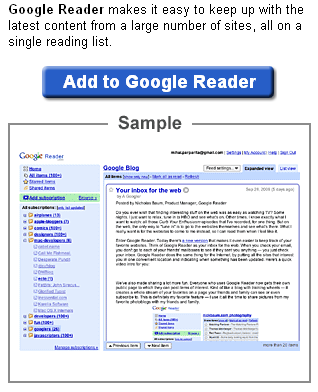
Now, whenever I find a feed I want to add to my RSS Reader (when using Firefox), I click the image chicklet and I am prompted to add it to Google Reader.

image

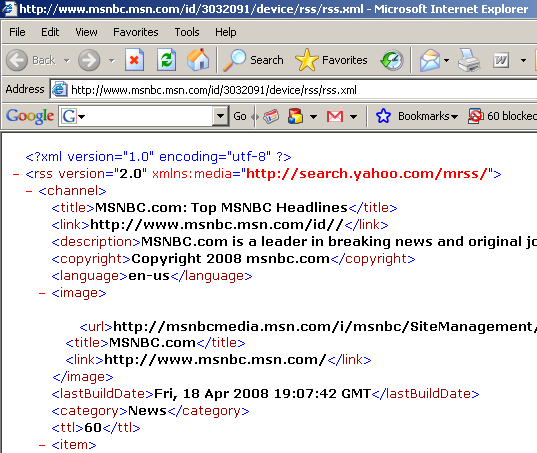
Internet Explorer 6 is not as RSS friendly.  When I click the image chicklet using IE 6, it opens a new windows to the raw RSS feed.  For example;

image

In this case, I would need to copy the URL (the http://yada.yada.yada) and paste it manually into my RSS Reader.  It is kind of a pain.  This is one of the main reason I avoid using Internet Explorer 6.

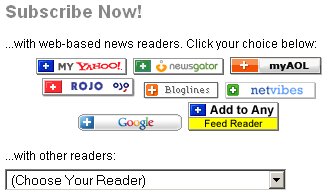
To make subscribing to RSS feeds easier with RSS unfriendly Internet Browsers, some sites will offer you several RSS Reader specific subscription options represented by icons.  For example;

  • MSNBC offers several icons that allow you to directly subscribe with Windows Live RSS Reader, Yahoo's RSS Reader, NetVibes RSS Reader, Bloglines RSS Reader, or an XML icon that allows you to subscribe with any other RSS Reader.
    image
  • CNN offers a direct access icon to subscribe via Yahoo's RSS Reader or the standard RSS chicklet.
    image
  • Many blog sites (including myGTDstuff.com) offer an array of RSS Reader options once you click the RSS chicklet (image).
    image


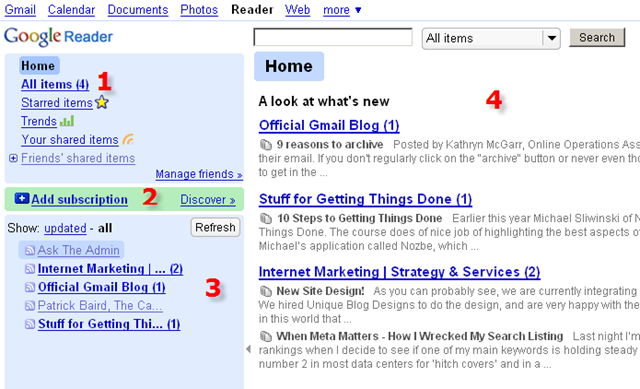
So you've subscribed to a number of RSS feeds, what does it look like?  All RSS Readers are a bit different.  Here is what it looks like using Google's RSS Reader.
image

  1. To view all of the new articles from all of your subscriptions click All Items.
  2. To add an additional RSS feed that you want to subscribe to, click Add Subscription.  Google Reader has a cool feature called Discover.  When you click the Discover link, Google will present you with a list of RSS feeds that it thinks you might like.
  3. Area 3 shows all of your active subscriptions.  Click the name of each feed to view the latest articles.
  4. Area 4 is the reading section.  The latest articles will appear in area 4.


Still confused?  Check out this nicely crafted video titled RSS in Plain English.
I hope this gives you a good idea of what RSS is all about and how you can use RSS feeds to view website content from multiple sources (feeds) in one place.  Feel free to contact me with any questions.

Sunday, April 20, 2008

GTD Digest 2008-04-20

Weekly recap of GTD highlights (news, views, tips and tricks) from around the web

[8 Entries]

GTD soft review for your Apple Mac
By Danil Negrienko(Danil Negrienko)
Ghost Action - only for simple tasks on the theory of reference GTD. Among the pluses include synchronization with any supported by iSync devices. Worth $ 19.95. Actiontastic - is a very simple program like Ghost Action. ...

David Allen: The Curse Of The Eternally Urgent
By David Allen
The David Allen Company is a professional training, coaching, and management consulting organization, based in Ojai, California. Its purpose is to enhance performance and improve the quality of life by providing the world's best ...

Maintaining “Inbox Zero” with Google Apps
WebWorkerDaily - San Francisco,CA,USA
I don’t follow “Getting Things Done” to the letter. But there’s one tenant I hold close to my heart: only touch an email once. Read it, decide what to do ...

Get organized with Toodledo Online Todo List
By sali
Getting Things Done (GTD) friendly online todo list - there are the “Context” option for you to define tasks based on location or what you actually do eg work, home, telephone, car. “Tags” support is also available. ...

Building better habits
China Daily - China
Getting Things Done (GTD) is based on the principle that a person needs to get tasks out of his head and onto a list. Writing down a list of tasks frees the ...

Mindmap of Getting Things Done (GTD) by David Allen
By pkab
As an experiment, this is a mindmap I created of the methodology of Getting Things Done by David Allen. (Click on image to enlarge.) (UPDATE: By popular request, I’ve also created a printable PDF file. If DavidCo gives me [...]

Simply GTD with Kelly: A short list of a few good GTD list managers
By kelly@davidco.com (Kelly)
A good GTD list manager should give you a bullet-proof, rock solid, trusted place to track your projects and actions. A starter set of lists David Allen recommends to store in that system would include: Projects Someday/Maybe @Agendas ...

An Interesting Interview with David Allen
By fwade
I just listened to a very interesting interview of David Allen of GTD fame conducted by Merlin Mann of 43 folders. In the interview Allen speaks frankly about the development of the GTD system, and concludes that if he were to write the ...

Saturday, April 19, 2008

The Future of TV

We cannot perform at our peak 24 hours a day, 7 days a week.  On occasion we need to disengage, kick back, relax and re-energize.  For me, I prefer to relax with a good movie or television show.  The bummer about TV is that inevitably, what I want to see, is not on when I have time to sit down and watch it (yes, I don't own a Tivo).  The Internet is changing that.

If I may be so bold; This technology shift, that finally merges TV, Movies and the Internet, is called HuluHulu is a website offering a a ton of popular TV shows and full length movies on-demand.  ...and here's the best part; It's all Free!

Hulu is a joint venture between NBC Universal and News Corp.  Hulu offers online TV and Movies from more than 50 content providers including FOX, MGM, NBC, Sony Pictures Television Warner Bros., and Lionsgate.  Hulu was founded in March 2007 and officially launched their website on March 12, 2008.  Hulu has a simple, easy to use, easy to search, easy to navigate user interface.  What separates Hulu from any of the other online video websites is the huge amount of quality online content.  The folks who own Hulu, own a ton of content.  The technology to display the content already existed, NBC and News Corp just needed to pony up the initial content.  And they did; making Hulu the poster child for the future of on-demand television.

Hulu offers full-length episodes of not only current hit shows like My Name is Earl, The Simpsons and The Office but also classics like The Bob Newhart Show, Miami Vice and Hill Street Blues, and in some cases, as with Arrested Development or Friday Night Lights, they have every episode ever aired. The full length movie collection includes Field of Dreams, Meet Joe Black, and Psycho, to name a few.

I would highly recommend giving Hulu a try.  Click play below for a quick introduction to Hulu.

Special shout-out to my son Kyle for turning me on to Hulu!  Thanks Kyle! image

No Turn-By-Turn Voice Navigation on my iPhone 4!

A friend of mine gave me a ride home recently.   We were not sure how to get from Point A to Point B so he fired up his iPhone 4S Maps App...